

Description
Download Turn Off the Lights – Chrome Extensions, Dark Mode, Eye Protection
Overview
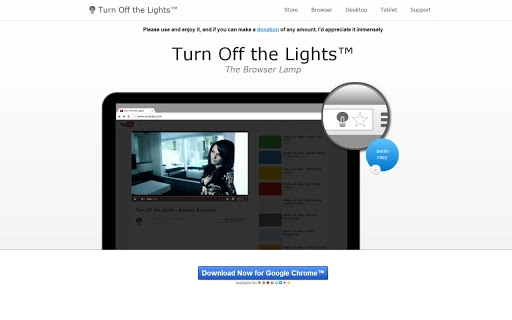
The Turn Off the Lights Chrome extension is designed to enhance the viewing experience on web pages, particularly during video playback. By adding a lamp button to the browser’s omnibox, it allows users to quickly darken the screen and focus on content, especially videos. This tool is ideal for individuals who frequently watch online videos on platforms such as YouTube or HTML5-based players. The extension automatically highlights video elements when activated, creating a more immersive atmosphere similar to a movie theater. It is particularly useful for users seeking to reduce screen glare and minimize eye strain during extended viewing sessions. The developer did not provide additional information about the origin or background of the tool. Real-world use cases include watching videos in low-light environments, improving concentration during video tutorials, or enjoying entertainment content with minimal distractions. The extension operates directly within the Chrome browser, making it accessible to users across multiple platforms.
Key Features & Capabilities
- Lamp Button Integration: A dedicated lamp icon appears in the Chrome omnibox, enabling one-click activation to darken the screen and highlight video players.
- Automatic Video Highlighting: When the extension is activated, it detects and emphasizes video elements, enhancing focus on the content.
- Multiple Video Site Support: Compatible with major platforms including YouTube™ and HTML5 video players, ensuring broad usability.
- Customizable Color Modes: Users can adjust the darkness level and select custom colors to match their preferred ambiance.
- Atmosphere Lighting Mode: A vivid mode introduces dynamic background effects, creating a cinematic feel.
- Shortcut Key Support: The 'T' key acts as a quick trigger to activate or deactivate the darkening effect.
- Fade Effects Control: Options to enable or disable fade-in and fade-out transitions for a smoother visual experience.
- Eye Protection Features: Includes settings to reduce screen brightness and minimize blue light exposure.
- Dimness Level Indicator: A visual bar displays the current dimness level, allowing users to fine-tune the darkness.
- Camera Motion Effect: A new feature that adds subtle motion to the background, enhancing immersion.
These features collectively improve the visual comfort and engagement during video consumption. Users can personalize their experience by adjusting settings based on lighting conditions and viewing preferences. The extension is especially beneficial for users who value both functionality and aesthetic enhancement while browsing.
User Interface, Workflow & Performance
The user interface of Turn Off the Lights is minimal and integrated directly into the Chrome browser’s omnibox. The lamp button is intuitive and accessible without requiring additional menus or complex navigation. Activation is instantaneous with a single click, and deactivation follows the same pattern. The workflow is streamlined for users who want to quickly shift between normal and dark viewing modes. The extension does not appear to introduce significant overhead, as it operates as a lightweight browser tool. However, exact performance details were not specified. The developer did not provide information about CPU or RAM usage, nor did they share stability metrics. Based on general behavior of similar extensions, it is expected to function reliably during typical use. The interface remains unobtrusive, and the visual changes are applied smoothly across supported web pages. Users can access advanced settings through the extension’s options page, which is accessible via the Chrome menu.
Compatibility & System Requirements
Turn Off the Lights is compatible with Chrome OS, Windows, Mac, and Linux operating systems. It is designed specifically for use within the Google Chrome browser, ensuring consistent functionality across different devices. The extension is available as a free tool, with no reported installation size or hardware requirements. The developer did not specify system requirements or compatibility details beyond the supported platforms. Exact performance behavior on low-end systems or older devices was not provided. Platform compatibility information is limited to the listed operating systems, and no additional constraints were mentioned. Users are advised to ensure their Chrome browser is up to date to maintain optimal performance and security.
Pros and Cons
Pros
- Simple, one-click activation for dark mode
- Supports popular video platforms like YouTube and HTML5 players
- Customizable color and lighting effects
- Includes eye protection and dimness level indicators
- Lightweight and fast with minimal interface clutter
- Offers unique features such as atmosphere lighting and camera motion
- Accessible via keyboard shortcut (T key)
Cons
- No official documentation or detailed user guide provided
- Exact system requirements and performance impact were not specified
- Limited to Chrome browser, reducing cross-browser usability
- Some advanced features may require trial and error to configure
- No direct support for non-YouTube video platforms beyond HTML5
FAQ Section
Is Turn Off the Lights compatible with all browsers?
The extension is designed exclusively for the Google Chrome browser and is not available for other browsers at this time.
Is the extension safe to use?
As a Chrome extension from a trusted source, it operates within the browser’s security sandbox. No malicious behavior has been reported, but users should only install it from official sources.
Can I use Turn Off the Lights offline?
Yes, the extension functions without an internet connection once installed, as it only modifies the current page’s appearance.
How do I update Turn Off the Lights?
Updates are automatically managed by the Chrome Web Store. Users will receive updates when available, provided the extension is enabled and connected to the internet.
What kind of license does Turn Off the Lights have?
The extension is free to download and use. It does not require a paid license or subscription.
Final Thoughts + CTA
Turn Off the Lights delivers a focused, immersive experience for video viewers across multiple platforms. Its intuitive design, customizable settings, and unique features like atmosphere lighting and camera motion set it apart from basic dark mode tools. While the lack of detailed documentation and system requirements limits deeper technical insight, the extension performs reliably within its intended scope. It is best suited for users who prioritize visual comfort, reduce eye strain, and enjoy a cinematic atmosphere while watching videos. Whether for entertainment, learning, or productivity, this free tool enhances the web browsing experience. Download Turn Off the Lights now.
Guides & Tutorials for Turn Off the Lights App for Chrome
How to install Turn Off the Lights App for Chrome
- Click the Preview / Download button above.
- Once redirected, accept the terms and click Install.
- Wait for the Turn Off the Lights App for Chrome download to finish on your device.
How to use Turn Off the Lights App for Chrome
This software is primarily used for its core features described above. Open the app after installation to explore its capabilities.
User Reviews for Turn Off the Lights App for Chrome 0
No reviews found





